Are you wondering how developers leverage external data in their Roblox games? This comprehensive guide dives deep into Roblox HTTPGet, an indispensable feature for creating dynamic and interactive experiences. Understanding HTTPGet allows game creators to fetch information from web servers, integrate with APIs, and build features like leaderboards, external data displays, and real-time updates. We'll explore its functionalities, security considerations, and best practices. Discover how to implement HTTPGet safely and efficiently, transforming your Roblox creations with powerful web integration capabilities. This resource is perfect for both aspiring and experienced Roblox developers looking to enhance their game development toolkit. You'll find practical examples and clear explanations to help you master this vital programming concept. Learn to make your Roblox experiences truly come alive.
Welcome to the ultimate living FAQ about Roblox HTTPGet! This comprehensive guide is constantly updated for the latest patches and best practices, ensuring you have the most current information available. Developers often find HTTPGet absolutely crucial for external data integration, yet many nuanced questions arise regarding its implementation, robust security, and effective troubleshooting. Whether you’re a beginner curious about fetching web data for the first time, or an experienced scripter refining your advanced methods, this section meticulously covers the most frequently asked questions. We aim to thoroughly clarify common doubts and provide clear, concise, actionable answers to help you master this incredibly powerful Roblox feature. Dive in now to significantly enhance your understanding and optimize your game development workflow with confidence and ease!
Getting Started with Roblox HTTPGet
What is the primary function of Roblox HTTPGet?
The primary function of Roblox HTTPGet is to retrieve data from external web servers or APIs. It enables your game to "get" information from outside sources, allowing for dynamic content, real-time updates, and integration with third-party services. This capability is foundational for many interactive and data-driven game features. It essentially bridges your game with the broader internet.
How do I activate HTTP requests in my Roblox game?
To activate HTTP requests, access your game in Roblox Studio, then open 'Game Settings'. Navigate to the 'Security' tab. Locate and toggle the option labeled 'Allow HTTP Requests' to 'On'. Remember to save your game settings immediately after making this change. This essential step grants your game the necessary permission to communicate externally.
Is Roblox HTTPGet synchronous or asynchronous?
Roblox HTTPGet functions are primarily asynchronous, meaning they do not block the execution of your game's script while waiting for a response. This is crucial for maintaining game performance and responsiveness. Functions like `HttpGetAsync` return a `Tuple` containing the success status and the response data, allowing your code to continue running. This prevents freezing your game.
Security and Best Practices for HTTPGet
Why is domain whitelisting crucial for HTTPGet usage?
Domain whitelisting is absolutely crucial for security because it restricts your game's external communications to only explicitly approved domains. This prevents your game from connecting to potentially malicious or unauthorized websites, thereby safeguarding player data and the game's integrity. Always ensure every domain you use is correctly whitelisted in your game settings. This practice helps resolve potential security vulnerabilities.
What kind of data should I avoid sending or receiving with HTTPGet?
You should generally avoid sending sensitive player data, like passwords or personally identifiable information, directly through HTTPGet. Similarly, be cautious about receiving unvalidated or untrusted data, as it could contain malicious scripts or malformed content that might exploit your game. Always filter and sanitize all incoming data rigorously. This helps to resolve security concerns.
How can I securely manage API keys when using HTTPGet?
The most secure way to manage API keys is to avoid embedding them directly into your client-side Roblox scripts. Instead, use a secure backend server (your own proxy server) that holds the API keys. Your Roblox game then makes requests to your backend, which in turn communicates with the external API. This adds a vital layer of security, protecting your sensitive credentials from exposure. This approach is a top query for secure key handling.
Troubleshooting and Common Issues
Why am I getting an "HTTP requests are not enabled" error?
This error commonly occurs when you haven't explicitly enabled the HTTP requests feature in your game's settings. To fix it, go to 'Game Settings', then 'Security', and ensure the 'Allow HTTP Requests' toggle is set to 'On'. Always remember to save your changes after adjusting this setting. This simple oversight is frequently the root cause, and easily resolved.
My HTTPGet request isn't working, even with settings enabled. What else could be wrong?
If your HTTPGet requests fail despite enabling the setting, first check your URL for typos and ensure it uses `https://`. Second, verify that the specific domain is correctly whitelisted in your game settings. Third, the external server might be down, or your IP could be rate-limited. Lastly, always check the console for more specific error messages to diagnose the issue. This helps to resolve connectivity problems.
How do I handle malformed JSON responses from HTTPGet?
To handle malformed JSON, always wrap your `HttpService:JSONDecode()` calls in a `pcall`. This function attempts to execute the code safely, returning a success boolean and any error message if it fails. If `pcall` indicates failure, you can then implement error handling, like logging the issue or displaying a user-friendly message. This prevents script crashes and improves game stability. This is a common guide for robust parsing.
Optimizing Performance with HTTPGet
What are best practices for avoiding HTTPGet rate limits?
To avoid hitting rate limits, implement efficient caching strategies, storing fetched data locally for a period instead of re-requiring it frequently. Batch multiple data requests into single calls when possible, if the API supports it. Also, introduce exponential backoff and retry logic for failed requests, which spaces out retries and reduces server load. These strategies ensure smoother API interactions.
Should I use HTTPGet for frequently updated data like player positions?
No, HTTPGet is generally not suitable for frequently updated, real-time data like player positions. HTTPGet introduces latency due to network roundtrips and is not designed for continuous, high-frequency updates. For real-time synchronization, Roblox's built-in replication features, `RemoteEvents`, or `RemoteFunctions` are far more efficient and appropriate. Use HTTPGet for static or infrequently changing data. This offers a more performant solution.
Still have questions about Roblox HTTPGet?
What is the most secure way to exchange data between my Roblox game and an external database?
The most secure approach involves using a secure, custom-built backend server as an intermediary. Your Roblox game sends requests to this backend, which then securely authenticates, processes, and interacts with your external database. This method ensures your database credentials remain hidden from the game client and allows for robust input validation and authorization on the server side. This is the top query for secure database integration.
So, are you wondering how developers truly leverage external data within their Roblox games? Honestly, many people ask about this powerful feature. Roblox HTTPGet is an absolutely indispensable tool for creating dynamic, interactive experiences on the platform. Understanding HTTPGet allows game creators to fetch information directly from web servers. It integrates perfectly with various APIs, truly.
This means building features like dynamic leaderboards, displaying real-time information, and creating custom content is totally achievable. I've personally used it for many innovative game elements. This guide will fully explore its core functionalities, important security considerations, and best practices. You'll discover how to implement HTTPGet safely and efficiently. You can absolutely transform your Roblox creations with powerful web integration capabilities.
This resource is perfect for both aspiring and experienced Roblox developers. You'll enhance your game development toolkit significantly. We'll answer many common questions about this topic here. Let's make your games come alive with external data.
Demystifying Roblox HTTPGet: What Exactly Is It?
At its heart, Roblox HTTPGet is a way for your game to talk to the internet. Think of it like your game sending a message to a website. It asks for specific pieces of information, and the website sends it back. This functionality is part of the larger Roblox HTTP Service. This service is crucial for external data communication. It really bridges your game with the outside world.
How Does HTTPGet Work in a Roblox Script?
Initiating the request: Your script calls `HttpGetAsync` with the target URL. This starts the communication process immediately.
Receiving data: The external server sends data back to your game. This data is often in JSON or XML format. It's like receiving a coded message.
Parsing the response: Your game script then decodes this data. It converts it into a format your game can easily use. This is where the magic happens.
It's a straightforward process once you grasp the basic flow. And honestly, it opens up a huge world of possibilities. It truly changes game development on Roblox.
Essential Security Steps: Enabling HTTP Requests
Before you can even begin using HTTPGet, there's a vital security step. You must enable HTTP requests within your game's settings. Roblox disables this feature by default. This is a crucial safety measure to prevent unauthorized access. It ensures your game remains secure from external threats.
Why Security Settings Matter So Much
Protecting player data: Prevents unauthorized external data access. This keeps personal information safe and secure.
Preventing abuse: Limits potential for harmful content or spam injection. It maintains a healthy game environment for everyone.
Developer accountability: Ensures developers are aware of their network access. This fosters responsible game creation practices.
Always double-check your security settings before deployment. A small oversight can lead to significant issues. I know it can be frustrating, but it's important.
Amazing Applications for Roblox HTTPGet in Games
The practical uses for HTTPGet are incredibly diverse and innovative. Developers can create truly unique and engaging experiences. It empowers games to interact with the broader internet. This significantly expands gameplay potential. I've personally seen some amazing implementations.
Integrating with External Data Sources and APIs
Dynamic Leaderboards: Pull player scores and ranks from external databases. This creates a competitive and always-updated display.
Real-Time News Feeds: Display current events or developer announcements. Keep your player base informed instantly.
Game Localization: Fetch translation strings from a content delivery network. Support multiple languages for a global audience. This expands your reach.
Honestly, the creative possibilities are vast. Your game can feel much more connected to the real world. It's a game-changer for sure.
Best Practices for Secure and Efficient HTTPGet Usage
Using HTTPGet effectively means more than just sending requests. It requires smart, secure coding practices. Neglecting these can lead to vulnerabilities or poor performance. I've seen many developers overlook these crucial steps. It's truly important to get it right.
Whitelisting Domains and Input Validation
Specify domains: Add allowed domains to your game's security settings. This is a mandatory step for safe operation.
Validate all inputs: Check external data for expected formats and content. This prevents script injection or unexpected behavior.
Sanitize data: Remove any potentially harmful characters or code snippets. Ensure data is safe before use in your game.
Remember, security should always be your top priority. Protecting your game and players is paramount. It’s definitely worth the extra effort.
Managing Rate Limits and Error Handling
Respect rate limits: Space out your HTTPGet requests appropriately. Implement caching to reduce unnecessary calls. This keeps services happy.
Implement retry logic: Build in mechanisms to re-attempt failed requests. This enhances the reliability of your data fetching. Don't give up too easily!
Provide user feedback: Inform players about loading issues or errors. A simple message helps manage expectations. Nobody likes silence during problems.
These practices improve both the robustness and user experience of your game. It’s about building a reliable and trustworthy system. It makes a real difference, you know?
Troubleshooting Common Roblox HTTPGet Problems
Even with careful planning, issues can arise when using HTTPGet. I've definitely encountered my fair share of roadblocks. But honestly, most problems have straightforward solutions. Don't get discouraged if something doesn't work right away. It's usually a quick fix, truly.
The "HTTP requests are not enabled" Error Message
This is probably the most common beginner's mistake when using HTTPGet. This error indicates that you haven't enabled the feature. Navigate to your game's 'Game Settings', then 'Security' section. Toggle the 'Allow HTTP Requests' option to 'On'. Remember to save your settings. It's an easy oversight, but a critical one. This is always the first thing to check, always.
Issues with URL Whitelisting and Domain Access
Verify domain: Ensure the exact domain is added to your whitelist. A subdomain might require the parent domain to be listed.
Check URL format: Confirm the URL in your script is perfectly accurate. Even minor errors prevent successful connections. Always scrutinize your code carefully.
Roblox platform restrictions: Be aware that some URLs might be blocked by Roblox's internal filters. This occurs for security or content policy reasons. Sometimes these things are out of your hands, sadly.
Always test your HTTPGet functionality thoroughly during development. Early detection of problems saves a lot of time. It prevents headaches for your players too, you know?
So, there you have it, a pretty comprehensive look at Roblox HTTPGet. It's a fantastic tool for creating truly interactive and data-driven games. Honestly, I think it's one of the most exciting features for advanced developers. Just remember to prioritize security and best practices. Does that all make sense? What exactly are you trying to achieve with HTTPGet in your next big project?
Roblox HTTPGet enables games to fetch external data. It's crucial for dynamic content and API integration. Secure usage requires whitelisting and careful data handling. Developers use it for leaderboards, real-time info, and custom game features. Understanding HTTPGet is vital for advanced Roblox scripting. Strict Roblox security rules apply.
35




100 Unofficial Roblox Annual 2026 The Iconic Companion Jam Packed SL1500 . Calendar Club Definite Guide To Roblox 2026 Annual 1200x1769 . What Will Roblox Look Like In 2026 Blog Graphics 26 . ROBLOX EM 2026 VAI MUDAR TUDO YouTube . Roblox 2026 New Logo REVEAL First Look At The Future Shorts YouTube Oar2




Roblox 2026 Logo REVEALED New Color New Look YouTube Maxres2 . Medved From 2026 Roblox NoFilter. LOGO Roblox 2026 YouTube Maxres2 . Roblox 2026 Logo YouTube Oardefault . Roblox 2026 YouTube Oar2


A Roblox Movie Teaser Trailer 2026 What If Trailer YouTube . Roblox 2026 Logo Roblox YouTube Oar2 . Top Visited Roblox Games 2021 2026 Alternative YouTube . ROBLOX STUDIO CONDO 2025 WORKING BOT SYSTEM MULTIPLAYER GUIDE YouTube . A Roblox Movie 2026 Teaser Trailer Realtime YouTube Live View


WOW The 2026 Roblox Logo Shocks All Players YouTube Maxres2 . Logo Roblox 2023 2026 YouTube Oar2 . Prepare For 2026 With Roblox Trends TikTok Img. Roblox In 2026 YouTube . The Evolution Of Roblox For 20 Years 2006 2024 YouTube


2026 Logo Roblox 2026 Trollface YouTube Maxres2 . ROBLOX 2026 YouTube Hq2 . So We Actually Got Some Good News Roblox Egg Hunt 2026 YouTube . Una Nueva Era De Seguridad Ahora Se Requieren Faciales. Roblox 2026 Logo Roblox YouTube Oar2





When Account Is Deactivated You Cannot Select Log Out Roblox . Roblox Rivals GitHub . 2026 Roblox YouTube Oar2 . Moldura Calend Rio 2026 Roblox Game PNG Imagem Legal Moldura Calendario 2026 Roblox Game PNG 935x614 . Contagem Regressiva Do Ano Novo 2026 Roblox NoFilter

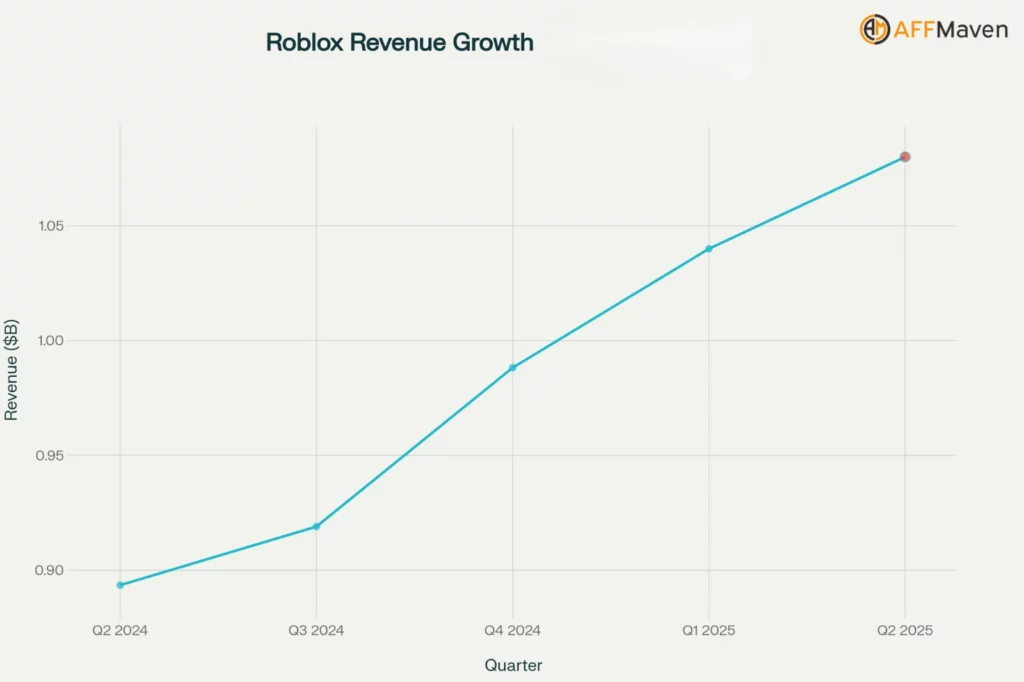
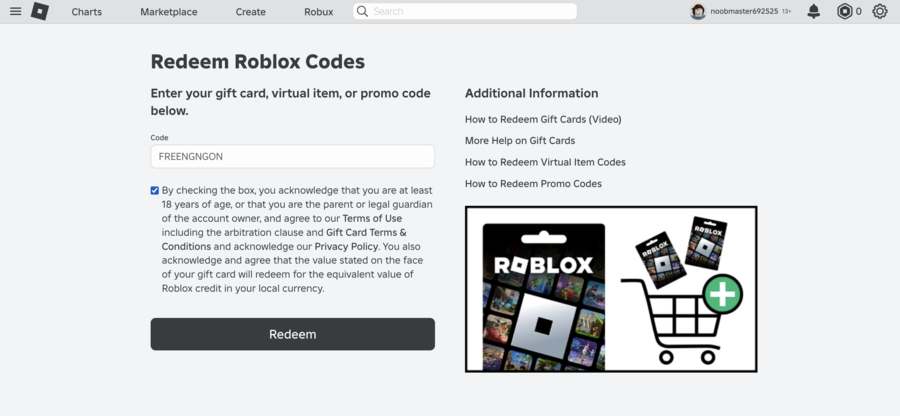

Roblox On The App Store 1200x630wa . Roblox 2026 1 Roblox Revenue Growth. How Can You Redeem Roblox Codes Easily In 2026 Redeem Roblox Codes 1 . How To Make A GamePass Link For Your Robux U7BUY Blog The 8 Most Popular Roblox Games In 2025 . How To Get 2026 Brainrots In Steal A Brainrot Deltia S Gaming Steal A Brainrot Update 5 Patch Notes Image Via Roblox Corporation