Navigating the world of internet speeds for optimal gaming can feel like a boss battle especially when juggling work family and personal time Most gamers dont have endless hours to troubleshoot slow connections or lag spikes This comprehensive guide cuts through the technical jargon to give you practical up-to-date advice on what internet speed for gaming truly matters in 2026 We delve into download and upload speeds ping latency and connection types to help you understand what you need for a smooth enjoyable gaming experience Whether you play on PC console or mobile this resource addresses common pain points like buffering during streams slow downloads and the dreaded mid-match disconnect Our goal is to empower you with the knowledge to optimize your setup balance your budget and ensure your gaming time is spent playing not waiting Discover how to get the most out of your internet connection for everything from competitive esports to relaxing social games and stay current without the hype
Related gamesWhat are the essential internet speed components for gamers in 2026?
For gamers in 2026 the crucial components are download speed upload speed and critically low latency (ping). Download speed impacts game downloads and receiving game world updates. Upload speed is vital for sending your actions and voice chat. However latency the time it takes for data to travel to the server and back directly affects how responsive your game feels and is paramount for competitive play.
Why is low latency more important than high download speed for competitive gaming?
While high download speed facilitates quick game downloads and smooth asset loading it does not directly impact the real-time responsiveness of your in-game actions. Low latency or ping ensures that your commands reach the game server and return with minimal delay allowing for precise movements and immediate reactions in fast-paced competitive titles. A 100 Mbps connection with high ping will feel laggier than a 50 Mbps connection with low ping.
How much internet speed do I realistically need if I only play single-player games?
If you primarily play single-player games and only occasionally dabble in online features your internet speed requirements are much lower. You primarily need enough speed for initial game downloads and periodic updates. A reliable 25-50 Mbps download speed is more than sufficient for this purpose allowing quick downloads without issues. Upload speed becomes less critical in this scenario.
Can mobile hotspot or satellite internet provide a good gaming experience?
While mobile hotspots and satellite internet can get you online they are generally not ideal for serious gaming. Mobile hotspots can offer decent speeds but often suffer from higher latency and data caps. Satellite internet almost always has significantly higher latency due to the distance data travels making it largely unsuitable for responsive online multiplayer games though casual or single-player games might be manageable.
What role does Wi-Fi 6 or 6E play in improving my gaming connection?
Wi-Fi 6 and Wi-Fi 6E offer significant improvements over older Wi-Fi standards particularly in congested environments. They provide higher theoretical speeds lower latency and better handling of multiple devices. While still not as stable or low-latency as a direct Ethernet connection for primary gaming devices Wi-Fi 6E can greatly enhance the wireless experience for mobile console and PC gamers who cannot run a cable especially reducing interference and improving consistency.
How does packet loss affect my gaming even with good speeds and low ping?
Packet loss occurs when data packets fail to reach their destination resulting in missing information. Even with fast speeds and low average ping, sporadic packet loss can cause noticeable stutters freezing and even disconnections in games. It often manifests as rubber-banding or unresponsive controls. It is a critical issue that can be caused by network congestion faulty hardware or interference and severely degrades the gaming experience.
Should I consider an internet plan with symmetrical upload and download speeds?
Symmetrical upload and download speeds typically offered by fiber optic connections are highly beneficial for gamers who also stream their gameplay host multiplayer servers or frequently upload large video files. While many ISPs offer much higher download than upload speeds symmetrical plans ensure that your outgoing data stream is as robust as your incoming data providing a smoother more professional experience for content creation and high-interaction online activities alongside gaming.
Are you a dedicated gamer balancing epic quests with everyday responsibilities like work family and life in general If so you know how precious your gaming time is There is nothing more frustrating than booting up your favorite title after a long day only to be greeted by crippling lag endless loading screens or dropped connections You are not alone in this struggle In 2026 approximately 87 percent of US gamers play regularly often dedicating 10 or more hours a week to their passion from competitive esports on PC to social mobile games and console adventures Many of us are looking for that sweet spot where our internet connection supports seamless play without breaking the bank or requiring a deep dive into networking lore Thats exactly what this guide is for We will explore the critical factors behind what internet speed for gaming you actually need cutting through the noise to provide clear actionable advice so you can spend less time troubleshooting and more time enjoying your virtual worlds.
You want a reliable internet setup that enhances your experience whether youre building worlds with friends on Minecraft dominating opponents in Warzone or exploring new universes in a VR title without constant interruptions This article is designed for the modern gamer like you who values performance optimization value for money and staying current without falling for every new piece of tech hype We will tackle common pain points from basic setup issues and performance problems to budget-friendly hardware upgrades and recommendations for making the most of your limited gaming time By the end you will have a solid understanding of how to assess your current internet speed what to look for in a new plan and practical steps to optimize your connection for the smoothest gaming possible Let's make sure your internet is a reliable teammate not a constant adversary.
What is the Minimum Internet Speed for Gaming?
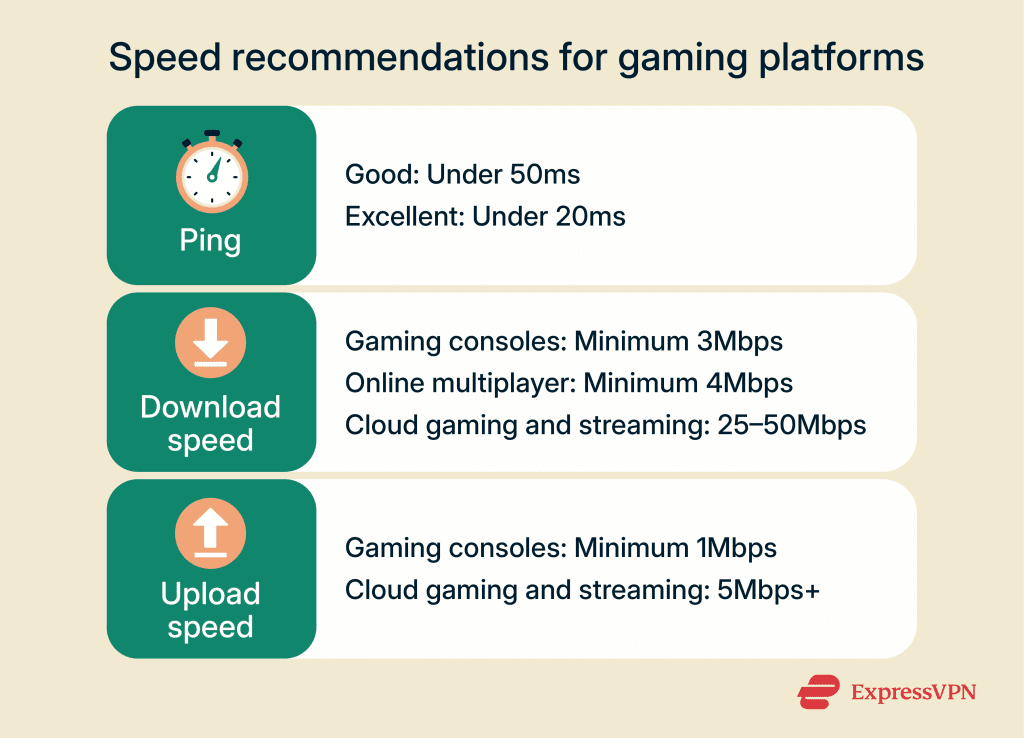
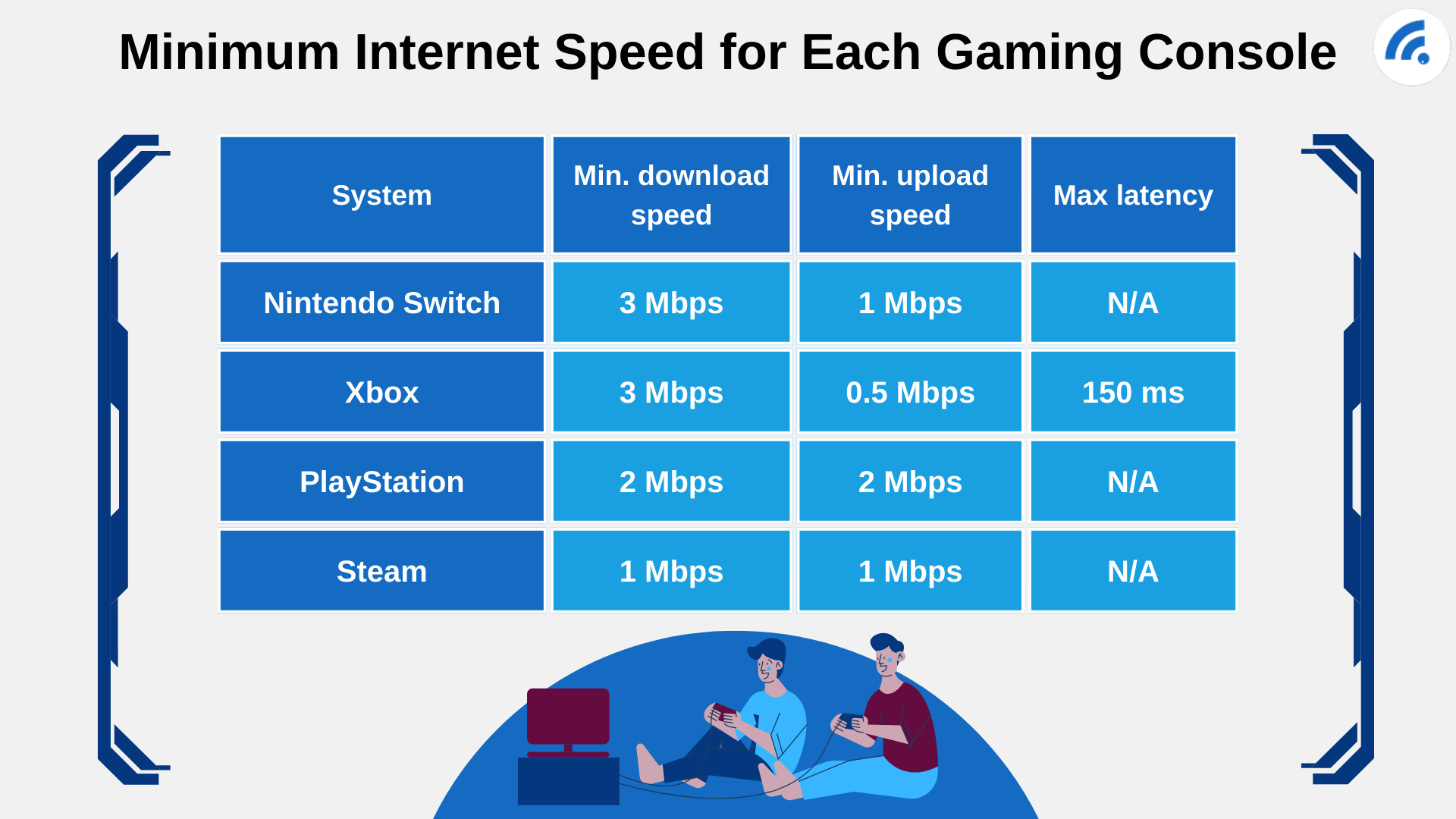
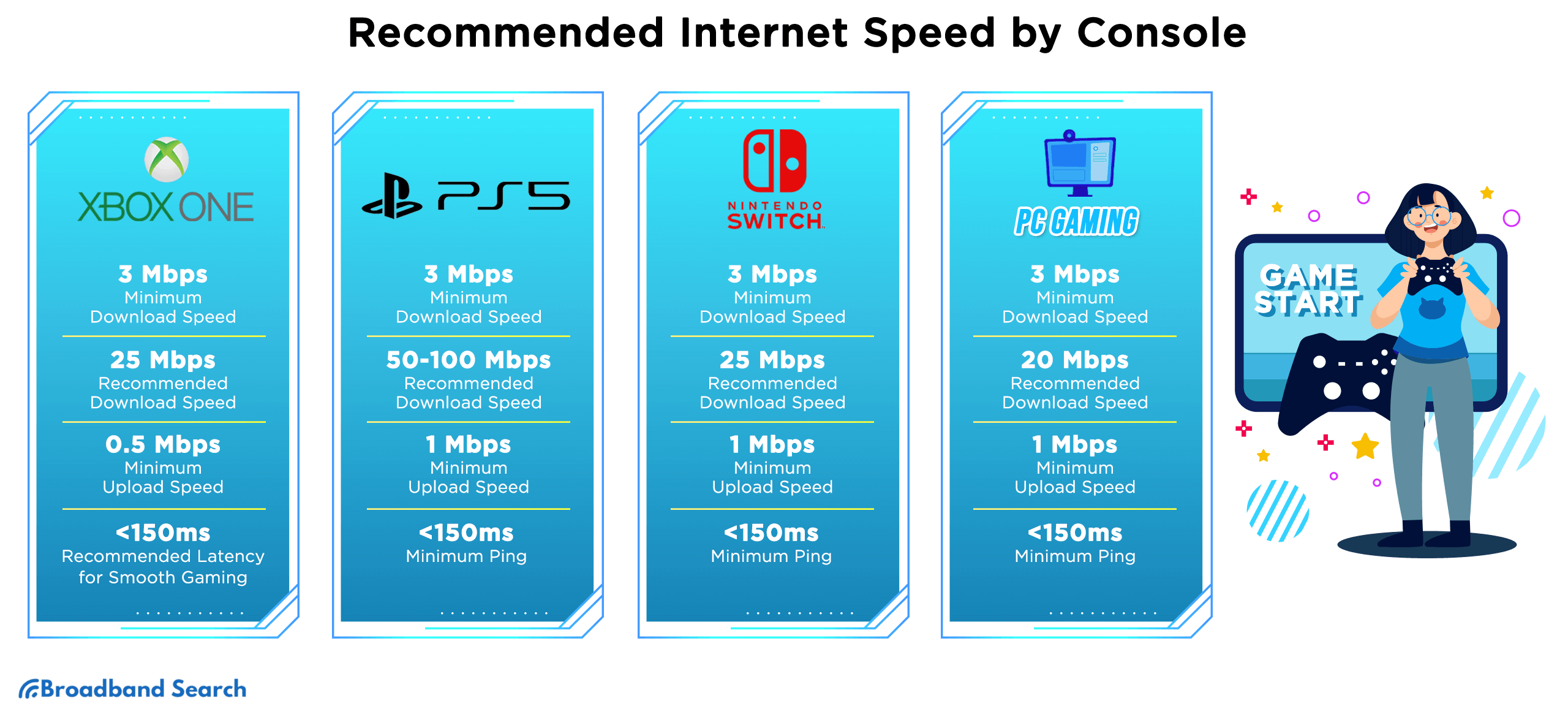
For most online gaming in 2026 the absolute minimum recommended download speed is typically around 3 to 5 Megabits per second Mbps per device playing. However this is truly the bare minimum and might only suffice for very light multiplayer games or if you are the only one using the internet in your household. For a smoother experience without frequent interruptions especially if other devices are active or you plan to download game updates aim for a more comfortable baseline of 10 to 25 Mbps download. This range provides enough bandwidth for most console PC and mobile games to run without significant lag due to speed alone.
How Do Download and Upload Speeds Affect Gaming?
Download speed determines how quickly your device receives data from the game server This is crucial for downloading game files updates and receiving real-time game world information. A higher download speed means faster game downloads and smoother streaming of game content. Upload speed on the other hand dictates how quickly your device sends data back to the server. While often overlooked for pure gaming upload speed is vital for sending your actions commands and voice chat data to the game server. For most online games 3 to 5 Mbps upload is a good target especially if you plan to stream your gameplay or use voice chat extensively. Insufficient upload speed can lead to a delayed response from your character or choppy voice communication a real frustration when coordinating with teammates.
Is Latency or Ping More Important Than Speed for Gaming?
Absolutely yes latency often referred to as ping is arguably more critical than raw download or upload speed for a responsive gaming experience. Latency measures the time it takes for a small packet of data to travel from your device to the game server and back It is measured in milliseconds ms. A low ping means your actions register almost instantly while high ping results in noticeable delays or lag. For competitive gaming anything below 50 ms is generally considered good with 20 ms or lower being excellent. Even with blazing fast download speeds high latency will still make your game feel sluggish and unresponsive This is especially true for fast-paced shooters or fighting games where split-second reactions matter.
What About Internet Speed for Streaming and Gaming Simultaneously?
If you enjoy streaming your gameplay to platforms like Twitch or YouTube while playing you will need significantly more bandwidth. While the game itself might run on moderate speeds the act of encoding and uploading high-quality video in real-time demands substantial upload capacity. For 1080p streaming at 60 frames per second you should aim for at least 10 to 15 Mbps upload speed in addition to your gaming needs. This means a total upload speed of 15 to 20 Mbps or higher is advisable. Your download speed should also be robust around 50 to 100 Mbps to ensure a buffer-free viewing experience for your chat and other online activities. Many modern gamers who balance work and life also enjoy passive content consumption like streaming movies or music in the background These activities further highlight the need for a well-rounded internet plan.
How Does Your Household Size Impact Gaming Internet Needs?
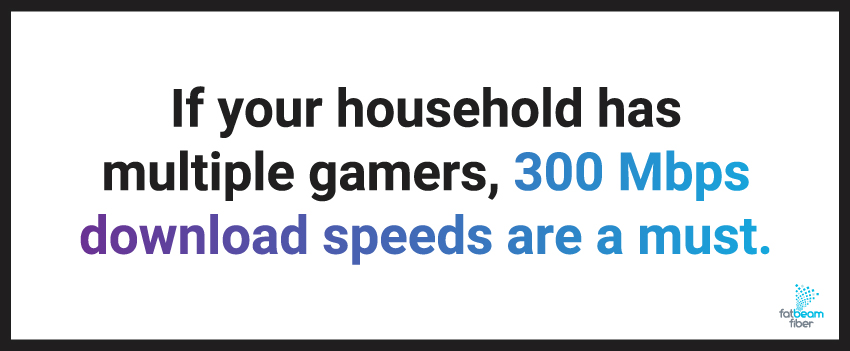
Your household's internet usage is a major factor in determining your required speed. If you live alone and game youll need less bandwidth than a family of four where someone is streaming 4K video another is on a video call and a third is downloading large files all while you are trying to play an online game. Each active device consumes bandwidth. For a typical family with multiple devices streaming working and gaming simultaneously a plan offering 100 to 200 Mbps download speed is a much safer bet. This ensures everyone's activities run smoothly without one person's gaming session hogging all the bandwidth or causing frustrating slowdowns for others. Remember you're not just buying speed for yourself but for your entire connected home.
Do Different Types of Games Require Different Speeds?
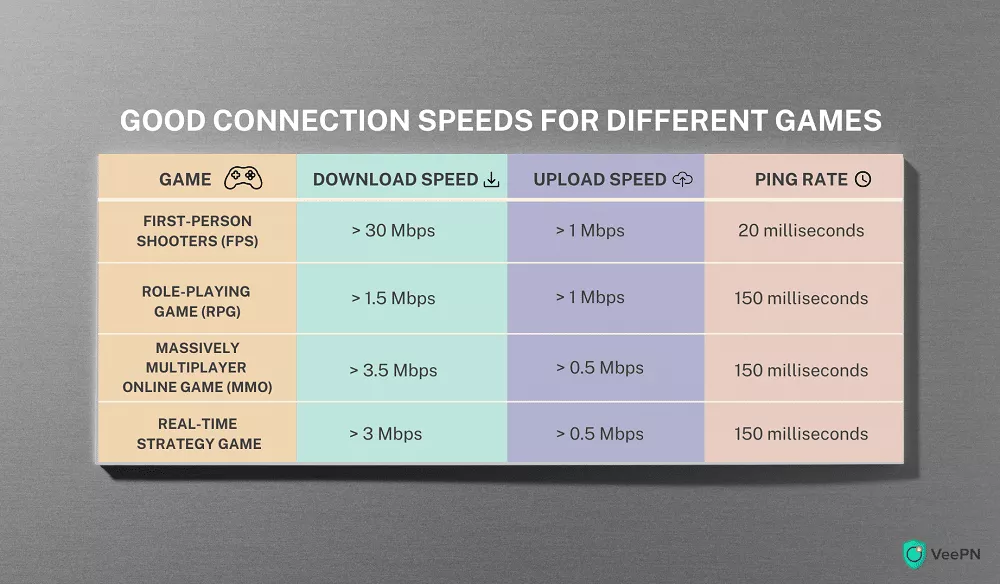
Yes different genres and game types have varying internet demands. Here's a quick breakdown:
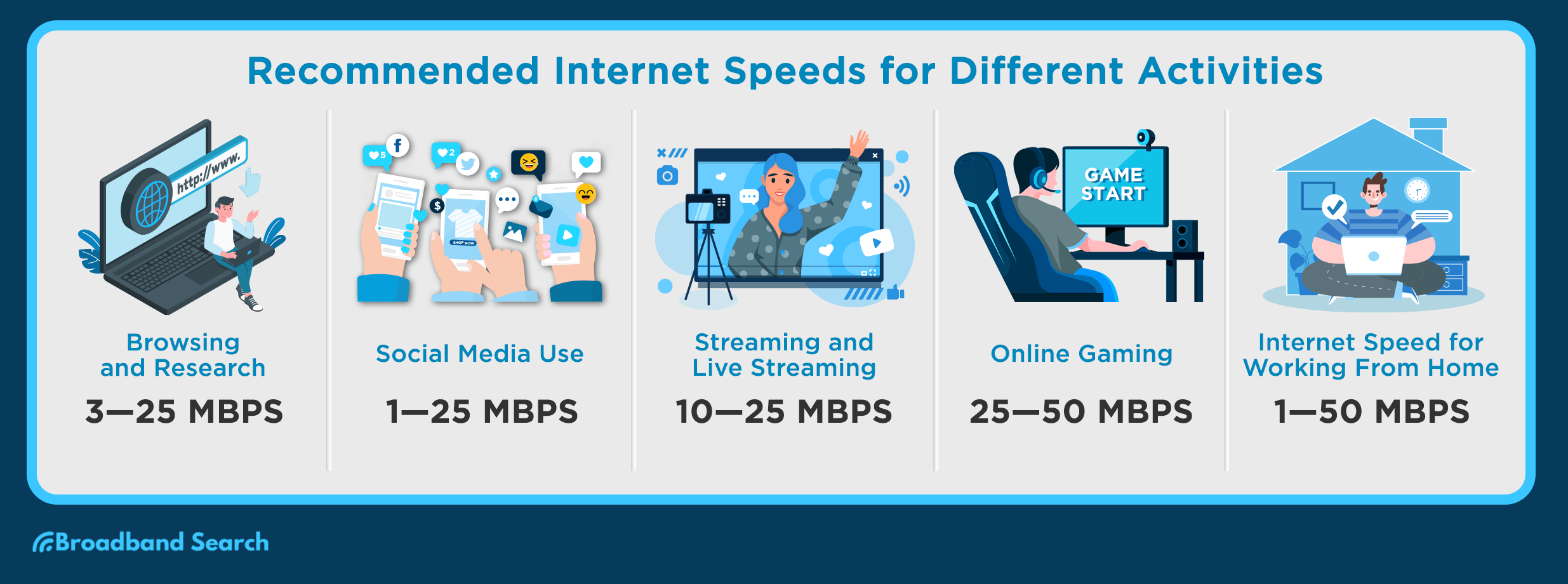
MMORPGs & Casual Multiplayer (e.g., WoW Minecraft Animal Crossing): These games are generally less demanding on raw speed but require a stable connection with low latency. 10-25 Mbps download and 3-5 Mbps upload are usually sufficient.
First-Person Shooters & Fighting Games (e.g., Call of Duty Valorant Street Fighter): These are latency-sensitive. While speeds of 25-50 Mbps download and 5-10 Mbps upload are good a consistently low ping (under 50ms) is paramount for competitive play and responsive controls.
Open-World & Battle Royale (e.g., Fortnite Apex Legends Elden Ring online): These often involve larger game worlds and more players requiring slightly higher sustained download speeds (50-100 Mbps) to load assets quickly and manage a dynamic environment. Stable upload (5-10 Mbps) is still important for smooth interactions.
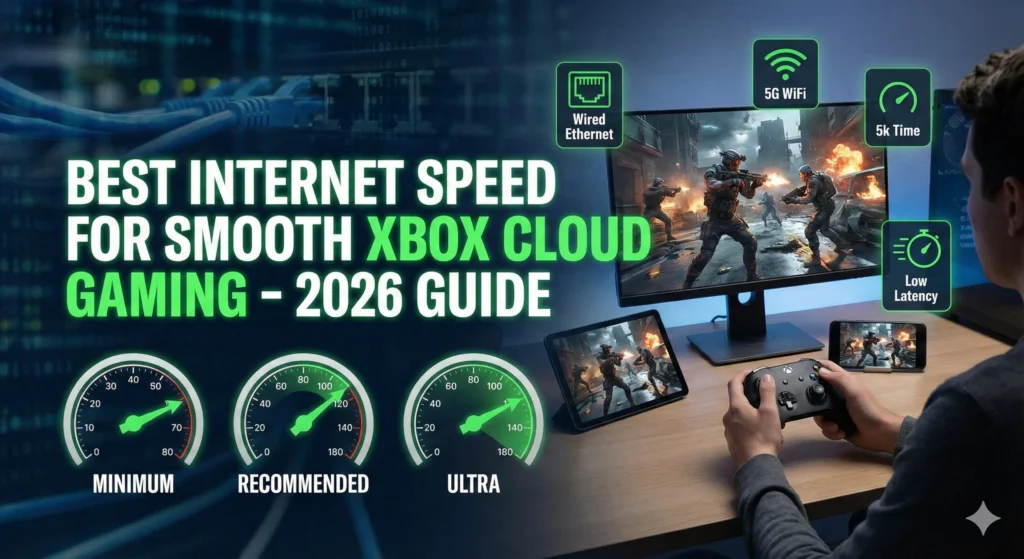
Cloud Gaming (e.g., Xbox Cloud Gaming GeForce NOW): These services stream the game to you like a video so they are highly dependent on high stable download speeds typically 50-100 Mbps minimum for HD quality and minimal input lag. Low latency is also crucial for a responsive feel.
VR Gaming (especially wireless VR): Modern wireless VR streaming like Meta Quest requires a very robust and stable local network often 100 Mbps or more on your internal network for smooth play. If playing online the internet requirements are similar to other high-fidelity games with low latency being key.
Wired vs. Wireless Which Connection is Best for Gaming?
When it comes to competitive online gaming a wired Ethernet connection will almost always outperform Wi-Fi. Here's why:
Stability: Ethernet cables provide a direct stable connection minimizing packet loss and interference that can plague Wi-Fi.
Lower Latency: Wired connections typically have lower and more consistent latency. This is crucial for responsive gameplay where every millisecond counts.
No Interference: Wi-Fi signals can be affected by other wireless devices walls and even your neighbors' networks leading to unpredictable performance spikes.
While modern Wi-Fi 6 and Wi-Fi 6E technologies have improved wireless gaming significantly a wired connection remains the gold standard for dedicated gamers especially those who play competitively or stream. If a wired connection isn't feasible consider a high-quality gaming router and position it optimally to reduce interference.
How Can I Test My Current Internet Speed for Gaming?
Testing your internet speed is simple and highly recommended. There are many free online speed test websites like Speedtest.net Google Speed Test or Fast.com To get the most accurate results follow these steps:
Connect Directly: If possible connect your gaming device (PC console) directly to your router with an Ethernet cable.
Minimize Usage: Pause any large downloads stop streaming services and ask others in your household to temporarily avoid heavy internet use.
Run Multiple Tests: Run the speed test a few times at different times of day to get an average reading. Internet speeds can fluctuate due to network congestion.
Note Down Results: Pay attention to your download speed upload speed and especially your ping or latency. Your ping to a gaming server is even more relevant than a general speed test server. Many game clients will show your in-game ping.
Comparing these numbers to the recommended speeds will give you a clear picture of whether your current setup meets your gaming needs.
What Internet Plan Should I Choose for Optimal Gaming Performance and Value?
Choosing the right plan involves balancing performance budget and household needs. For most dedicated US gamers in 2026 a fiber optic connection is the ideal choice offering symmetrical high speeds and incredibly low latency. If fiber isn't available cable internet is usually the next best option.
Casual to Moderate Gamers (1-2 users): A plan with 50-100 Mbps download and 10-20 Mbps upload should be sufficient for smooth gameplay and light streaming. Look for plans that emphasize low latency.
Dedicated Gamers & Streamers (Multiple users/heavy use): Aim for 200-500 Mbps download and 20-50 Mbps upload. This provides ample bandwidth for gaming 4K streaming large downloads and multiple devices without compromise.
Esports Pros & Future-Proofing: Gigabit (1000 Mbps) or multi-gigabit plans are excellent for ultimate performance near-instant downloads and future-proofing. While not strictly necessary for most games they offer peace of mind and handle any online activity you throw at them. Consider the value for money as higher speeds often come with diminishing returns for pure gaming.
Always check provider reviews for reliability and customer service as these can impact your overall gaming experience more than raw speed numbers alone. Many gamers are savvy shoppers balancing their budget with performance to get the best value.
How Can I Improve My Gaming Internet Connection Without Upgrading My Plan?
Even if you have a decent internet plan there are several ways to optimize your connection for gaming:
Use an Ethernet Cable: As mentioned earlier a wired connection directly to your router is the single best improvement for stability and lower ping.
Optimize Router Placement: If using Wi-Fi place your router in a central open location away from obstructions and other electronics that might cause interference.
Prioritize Gaming Traffic (QoS): Many modern routers have Quality of Service QoS settings. Enable QoS and prioritize your gaming device or specific game traffic to ensure it gets preferential bandwidth.
Update Router Firmware: Keep your router's firmware updated for security patches and performance improvements.
Limit Background Downloads: Close unnecessary applications and pause large downloads on your gaming device and other household devices during gaming sessions.
Check for Malware/Viruses: Malicious software can consume bandwidth. Run regular scans.
Consider a Gaming Router: These routers are designed with features like advanced QoS lower latency Wi-Fi and better coverage specifically for gamers. It can be a worthwhile budget upgrade.
Restart Your Router/Modem: A simple restart can often resolve minor connectivity issues.
These tips can significantly enhance your gaming experience without spending more on a faster internet plan. For gamers balancing life and work optimizing existing resources is key.
You are now equipped with the knowledge to conquer internet lag and optimize your gaming experience We have covered everything from the crucial role of latency to practical steps for improving your connection and choosing the right plan for your household Remember a stable low-latency connection often trumps raw speed for online gaming and a wired Ethernet connection is your best friend in the virtual arena By understanding these core concepts you can ensure your precious gaming time is spent enjoying the action not fighting your internet What is your biggest gaming challenge? Comment below and let's conquer it together!
FAQ Section
Q: Is 10 Mbps download speed good enough for gaming?
A: 10 Mbps download speed is generally considered the minimum for basic online gaming for one user. It might be sufficient for less demanding titles like MMORPGs or turn-based games but you might experience issues if others are using the internet or for faster-paced competitive games.
Q: Does 5G internet work well for gaming?
A: 5G internet can be excellent for mobile gaming due to its low latency and high speeds especially in areas with strong coverage. For console or PC gaming via a 5G home internet solution it can be a viable alternative to fiber or cable but may still experience more variability than a dedicated wired connection.
Q: How much internet speed do I need for PS5 or Xbox Series X?
A: For PS5 or Xbox Series X online gameplay 50-100 Mbps download and 5-10 Mbps upload are highly recommended to ensure smooth performance quick downloads and reliable voice chat. Always aim for a wired connection for these consoles.
Q: What is a good ping for gaming?
A: A ping of 50 milliseconds ms or lower is considered good for gaming. For competitive play aiming for 20 ms or lower is ideal as it minimizes delay between your actions and what happens on the server leading to a much more responsive experience.
Q: Will a gaming router improve my internet speed?
A: A gaming router primarily improves your internet *connection's stability and efficiency* rather than its raw speed from your ISP It can offer better Wi-Fi range stronger signal quality and advanced Quality of Service QoS features to prioritize game traffic potentially leading to lower latency and fewer dropped packets for a smoother gaming experience.
Q: Why is my internet fast but my game still lags?
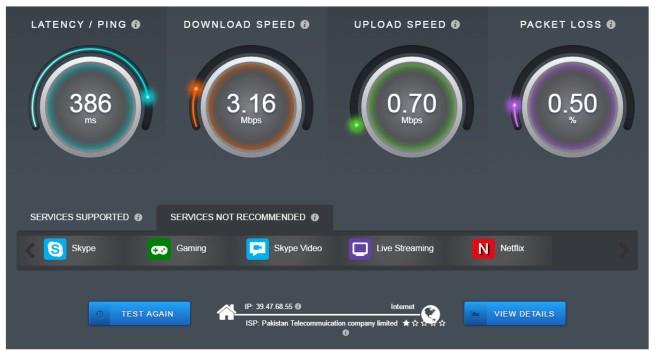
A: If your internet speed tests show high speeds but you still experience lag in games the issue is likely latency ping or packet loss not raw bandwidth. This can be caused by Wi-Fi interference a congested network route to the game server or an overloaded server itself. Using a wired connection and checking your in-game ping are good first steps to diagnose this.
Optimal internet speed for gaming balances download and upload needs Low latency ping is critical for responsive gameplay Fiber optic or wired Ethernet connections offer the best stability Consider household usage alongside gaming requirements Mobile gaming data plans are improving rapidly but fixed-line remains superior for consoles PCs
35

Best High Speed Internet Plans For Gaming And Online Streaming High Speed Gaming Internet . Best Internet Speed For Xbox Cloud Gaming 2026 Update Best Internet Speed For Xbox Cloud Gaming. What Is The Best Internet Speed For Gaming Update 05 2026 Best Internet Speed For Gaming Img . What Is A Good Internet Speed For Gaming 2026 Cable TV Info What Is A Good Internet Speed For Gaming 1024x683 . Internet Speed For Gaming How Fast Do You Really Need Internet Speed For Gaming 2 1024x738

)

Internet Test For Online Gaming At Maria Couch Blog WO Gaming Internet Speeds 1 . What Internet Speed Is Recommended For Gaming 2. Minimum Internet Speed For Each Gaming Console . What Is Ultrafast Broadband Speeds Benefits And How It Works In 2026 Filters Quality(75). Top 5 Newest Wi Fi 7 Gaming Router In 2026 Reviews Buying Guide . What Is The Best Internet Speed For Gaming Update 05 2026 Best Internet Speed For Gaming Img
What Is A Good Internet Speed For Gaming Streaming Fatbeam Blog Inline3 . What Is A Good Internet Speed For Gaming VeePN Blog Pasted Image 0 23.webp. Internet Test For Online Gaming At Maria Couch Blog G1 . A Guide To Internet Speeds G5 Recommended Speed . Annual Internet Service Provider Review 2026 Com Hsi Fastest Slowest Internet 2026 Featured Image.webp
What Are Good Gaming Internet Speeds Blog Banner 1024x576 . Internet Speed Test For Online Gaming Speed Test For Gaming . What Are Good Gaming Internet Speeds Gaming . Visualizing Global Inflation Forecasts 2024 2026 Fastest Internet Speeds 2024 SHARE 1000x600 . Supercharge Your Internet Tips Amp Tricks Top 20 Countries With The Fastest Internet Speeds 800x1118


What Is A Good Internet Speed For Gaming Good Internet Speed For Gaming. Supercharge Your Internet Tips Amp Tricks Internet Speed Statistics . Average U S Internet Speeds By State In 2026 TMS Blog Graphic U.S. States With The Fastest And Slowest Internet Speeds In 2025 . How Many Mbps Is Starlink Mini Dibujos Cute Para Imprimir Speed Chart . What Is A Good Internet Speed In 2026 For Browsing Streaming Gaming What Is A Good Internet Speed For Browsing Streaming Gaming 1
)


What S A Good Internet Speed For Gaming 2026 Guide Virgin Media O2 Filters Quality(75). Spectrum Internet Plans In 2026 Prices Speeds Deals Guide Cable Spectrum Internet Plans . Annual Internet Service Provider Review 2026 Methodology Hsi Aispr Internet Annual Review 2026 Featured Image.webp. Digital 2026 Internet Users Pass The 6 Billion Mark 14 Internet Connection Speeds Overview - 20251013 Digital 2026 Global Overview Report 84 . Internet Speed For IPTV 2026 How Much Do You Really Need Internet Speed For IPTV 2026 How Much Do You Really Need Complete Guide



Supercharge Your Internet Tips Amp Tricks Fastest Internet Speed . Digital 2025 Quicker Connections Accelerated Access 59 Fixed Internet Speeds By Country - 20250203 Digital 2025 Global Overview Report P96 . What Games Use The Most Bandwidth 1 585x469 . Top 10 Most Anticipated Games Of 2026 What To Watch Out For TVN GAMES IN 2026 . Starlink Internet Speed Test Real World Results 2026 2026 05 07 19h22 08 300x195